Frequently Asked Question
Disable Pop-Up Blockers 停止攔截彈出式視窗
Last Updated 9 years ago
If you are unable to view pop-up page (e.g.Web statistics page in Plesk), then you need to disable pop-up blocking.
Depending on the pop-up blocking software you are using, you may be able to set the URL as an allowed site, or you may need to disable the pop-up blocker while going to view pop-up page.
Pop-up blockers work in the background while you browse the internet. When they detect a pop-up window that may be an unwanted advertisement, they automatically block the pop-up.
To disable pop-up blockers:
Depending on the pop-up blocking software you are using, you may be able to set the URL as an allowed site, or you may need to disable the pop-up blocker while going to view pop-up page.
Pop-up blockers work in the background while you browse the internet. When they detect a pop-up window that may be an unwanted advertisement, they automatically block the pop-up.
To disable pop-up blockers:
| Internet Explorer With the release of Microsoft Windows XP Service Pack 2, pop-up blocking is integrated into Internet Explorer. By default, pop-up blocking is enabled. Listed below is the location of the menu within Internet Explorer: 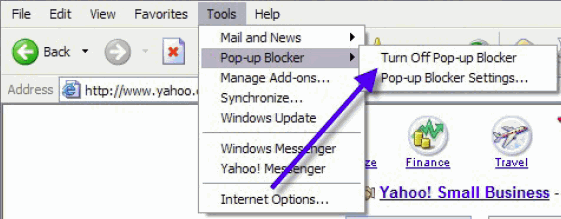 To disable pop-up blocking: click Tools, then Pop-up Blocker, then Turn Off Pop-up Blocker. |
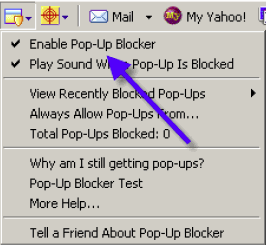
| Yahoo Toolbar The Yahoo Toolbar includes pop-up blocking. This is an example Yahoo Toolbar.  The following icon is the Pop-Up Blocker:  To disable Pop-Up Blocking:
|
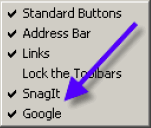
Google Toolbar The Google Toolbar includes pop-up blocking. To disable pop-up blocking, you must close the toolbar. This icon shows pop-up blocking activity:  To close the Google toolbar:
You MUST disable the entire Toolbar. |
MSN Toolbar The MSN toolbar includes pop-up blocking. This is an example MSN toolbar: The following icon is the Pop-Up Blocker:  To disable Pop-Up Blocking:
|
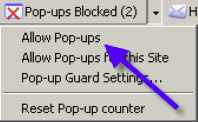
| AOL Toolbar The AOL Toolbar includes pop-up blocking. This is an example AOL Toolbar:  The following icon is the Pop-Up Blocker:  To allow Pop-ups to appear, click on the pop-up blocker icon. You should now see the following:  To re-enable pop-up blocking, click the pop-up blocker icon again. |
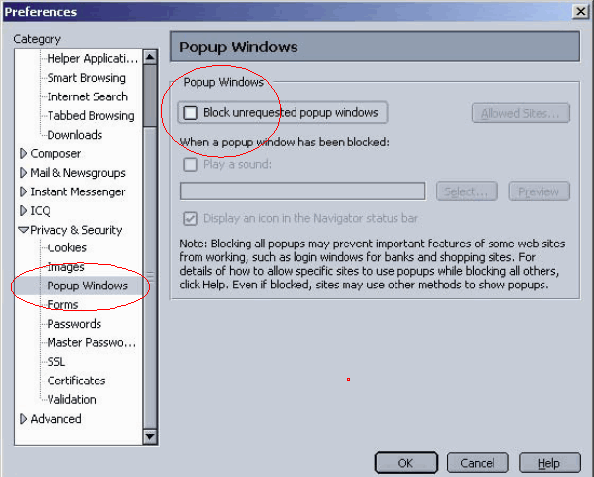
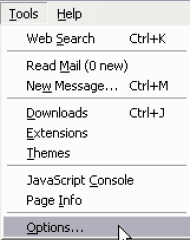
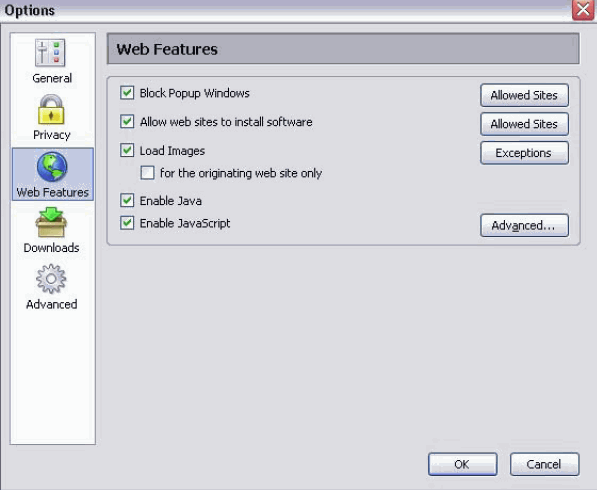
Netscape Toolbar Netscape's pop-up blocker is integrated into the browser. To disable the pop-up blocker:
|
| Mozilla Firefox Toolbar The Mozilla Firefox pop-up blocker is integrated into the Firefox browser. To disable the pop-up blocker:
|
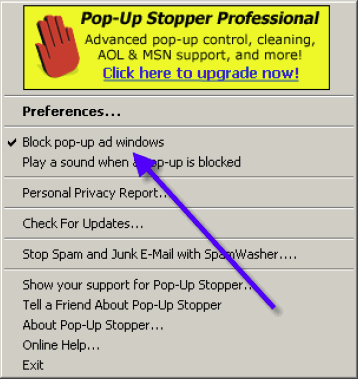
| Pop-Up Stopper This software is designed solely for preventing Pop-Ups. It will install an icon in the lower right corner of your Start Menu Toolbar  This is the Pop-Up Blocker icon:  To disable Pop-Up Blocking:
|
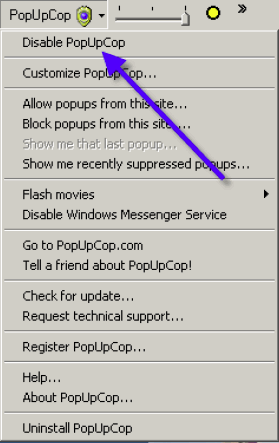
| Pop-Up Cop This software is also designed solely for preventing Pop-Ups. It installs the following toolbar within the browser:  To disable Pop-Up Blocking:
|
| Security Software Pop-up blocking functions are included in some anti-virus, internet security, personal firewall, and browser programs. Disable the relevant setting in the program or set the URL as an allowed site. Examples of programs that include pop-up blocking functions include the following.
|